Six Agent Tools, One Decision
Copilot Studio, Foundry, Agent Framework, the Agents SDK, and declarative agents are not five competing answers to one question. They answer different questions, and most of the confusion goes away once you see which question each one answers.
By Jai Ganesh · October 2026
I work across Azure and GCP, and "which one should we use?" is the question I hear most when a team starts building agents on the Microsoft stack. The honest answer is that it depends on one design decision. This post gives you that decision, a map of the options sorted by it, and a rule for choosing.
Why It Looks Messy
Microsoft’s product names mix four different kinds of thing. Put them in separate piles and the lineup shrinks quickly.
- 1.Build tools: where you define the agent. Agent Builder, Copilot Studio, the Agents Toolkit, Agent Framework.
- 2.Runtimes: where the agent executes. M365 Copilot itself, a Power Platform environment, Foundry Agent Service, or your own containers.
- 3.Channels: where users meet the agent. Teams, M365 Copilot chat, a website, an API.
- 4.Governance: who approves and controls it. The M365 admin center, Agent 365, Entra Agent ID.
Most "X versus Y" debates compare items from different piles. Teams versus Foundry is not a choice. One is a channel and the other is a runtime.
The Sorting Question: Where Does the Reasoning Run?
Every build option falls into one of two camps.
Copilot is the brain. You supply instructions, knowledge, and actions. Microsoft 365 Copilot’s own orchestrator and model do the reasoning. These are declarative agents.
You bring the brain. Your orchestration and your choice of model run somewhere else. Microsoft 365 is only the surface the user sees. These are custom engine agents.
The first camp is cheaper to build, run, and govern, and it gives you no control over the model or the reasoning loop. The second camp gives you that control and makes you responsible for it. Decide this first, because it determines cost, ownership, and how much of the platform you inherit for free.
The Six Build Options
Copilot Is the Brain
Agent Builder. End users build these inside M365 Copilot with a prompt and some SharePoint sites or files. They suit personal and team helpers. No code, no IT involvement.
Declarative agents. Developers build these with the M365 Agents Toolkit. You define instructions, knowledge, and actions through OpenAPI or MCP, and keep it all in source control. This is "Copilot plus my data and my APIs", and it is the right answer more often than teams expect.
You Bring the Brain
Copilot Studio. A low-code platform with its own orchestrator — distinct from Copilot’s reasoning engine — running in a Power Platform environment. It falls in this camp because you are choosing a different orchestration layer, not delegating reasoning to Copilot. It suits workflow-heavy agents, connector-driven integration, and teams where makers own the agent. It also works as a front door that routes to specialist agents behind it.
Foundry Agent Service. A managed Azure runtime for pro-code agents. You choose the model, define the orchestration, and get tracing, evaluations, and content safety from the platform. This is where serious custom agents belong.
Agent Framework. The open-source SDK for writing agent and multi-agent logic in code. It consolidates Semantic Kernel and AutoGen. It is a library, not a host, so you run it in Foundry or in your own containers.
M365 Agents SDK. The SDK for building the conversational front end yourself. Use it when you need full control of the Teams and Copilot experience, or when the agent’s brain lives outside Microsoft entirely and you need a bridge.
The Map
The same six options on one page, sorted by where the reasoning runs and where each can be distributed.
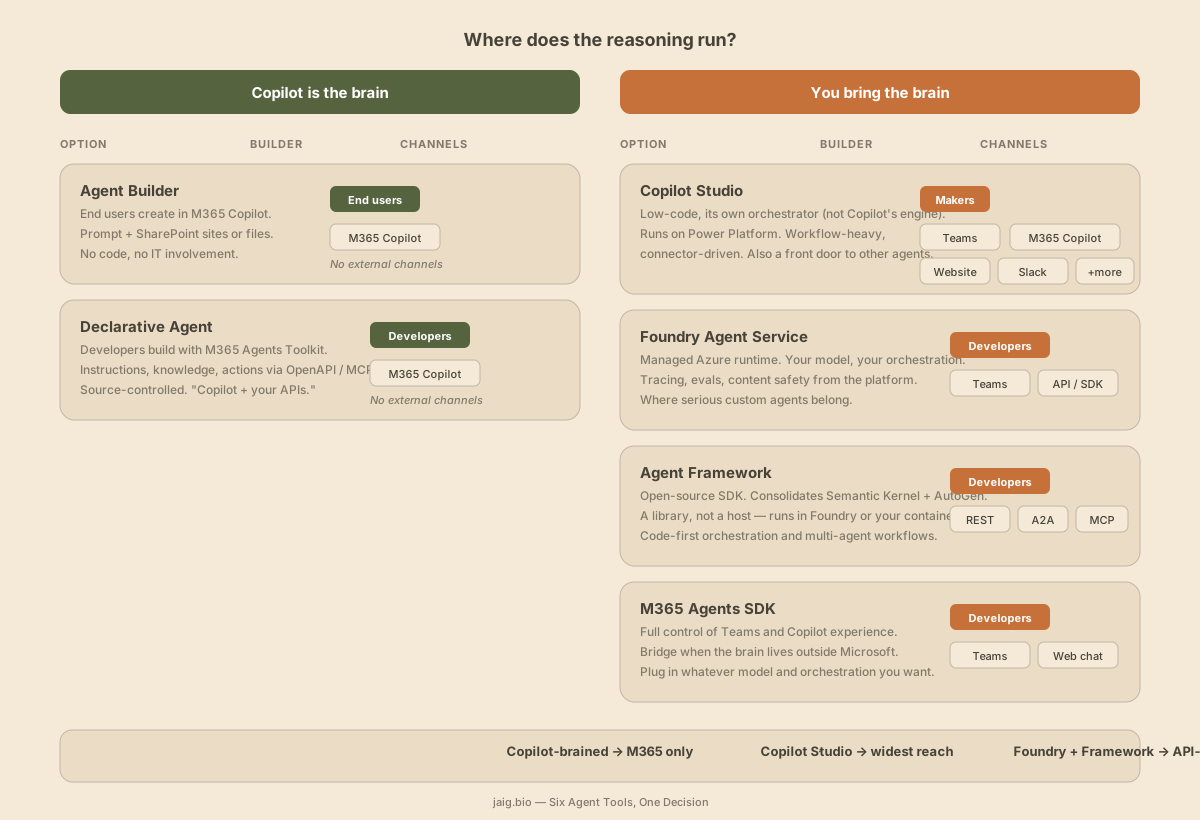
Three patterns stand out. Copilot-brained agents live only inside Copilot. Copilot Studio has the widest reach out of the box, especially for customer-facing channels. Foundry and Agent Framework are API-first, and M365 is one publish target among several.
Names That Are Not Build Options
Several names appear in every architecture conversation and are not choices you make between.
- 1.M365 Agents Toolkit: VS Code tooling for packaging and publishing. It is not a runtime.
- 2.Azure Bot Service: channel plumbing between Teams or Copilot and a custom engine agent.
- 3.Semantic Kernel and AutoGen: the predecessors of Agent Framework. Start new work on Agent Framework.
- 4.Agent 365 and Entra Agent ID: the governance layer. A registry, identities, and access policies for agents, wherever they were built.
- 5.Teams and M365 Copilot: channels. Teams is the broader and more flexible one. Copilot puts your agent next to the user’s other Copilot work.
- 6.MCP and A2A: open protocols. MCP connects agents to tools and data. A2A connects agents to other agents.
How to Choose
Start at the lowest rung that meets the requirement, and climb only when you hit a limit.
- 1.Can Copilot’s own reasoning do the job with your data and APIs? Build a declarative agent.
- 2.Is it mostly process and connectors, or owned by a business team? Use Copilot Studio.
- 3.Do you need your own model, orchestration, or rigorous evals? Use Foundry with Agent Framework.
- 4.Do you need bespoke Teams behavior, or is the agent outside Microsoft? Front it with the M365 Agents SDK.
The common mistake is starting at rung three because it is the most interesting to engineers. Many agents built as custom engines could have been declarative agents with an MCP server behind them.
These options also combine. A frequent enterprise pattern is Copilot Studio as the front door with a Foundry agent as the specialist behind it. One caution on that pattern: if the front door only relays, it adds latency and a second failure point without earning its place. Publish the core agent directly unless the front door earns its place.
What Is Durable
The agent shell is the cheap part. The durable investments are the things every option can consume.
- 1.MCP servers for your tools and data. A declarative agent, a Copilot Studio agent, and a Foundry agent can all call the same server. Build the capability once and govern it once.
- 2.A2A endpoints for your specialist agents. An agent exposed over A2A can sit behind Copilot Studio today and another front end tomorrow, including one on a different cloud.
- 3.Identity decisions. Decide early whether tools act as the signed-in user or as the agent’s own identity. That choice outlives any product rename.
One governance fact holds across all six options. Before an agent is available organization-wide in Microsoft 365, an admin approves it in the M365 admin center. Design your release process around that gate, not around the build tool.
Closing
Ask where the reasoning runs, pick the lowest rung that works, and put your long-term effort into MCP servers, A2A endpoints, and identity. The product on top can change without taking that work with it.
A caveat on currency: Microsoft renames and reshuffles this lineup often, and preview features move to general availability on their own schedule. Check current names and status against the documentation before you commit a design to them.
Enterprise architect and independent AI consultant — I help teams take agentic systems from deck to production, with the governance story intact.